Flat Rate Shipping Guide

Many vendors choose Flat Rate Shipping because it is simple and predictable for both the seller and the buyer. Essentially, this method allows you to set a fixed price for delivery, regardless of the value or weight of the items in the customer’s cart. Because it is easy to understand, this strategy often leads to fewer cart abandonments.

First, you must decide on a consistent rate that covers your average postage costs. Furthermore, you should ensure this rate remains competitive compared to other sellers in your niche. If you are just starting out, Flat Rate Shipping is the most straightforward way to begin selling on The Hive NZ.

Although this method is perfect for basic orders, you might eventually need more flexibility. Therefore, we have provided a more in-depth guide on advanced options in the next article. In that guide, you will learn how to adjust your rates based on specific product requirements.

Basic Flat Rate Setup

Follow these steps to configure your delivery options. Flat Rate Shipping allows you to provide predictable costs for your customers.

Step 1: Click the three dots beside the zone you wish to edit. Please note that if you do not edit a zone, customers from that region will be unable to order from you. Once you click the dots, a new screen will open.
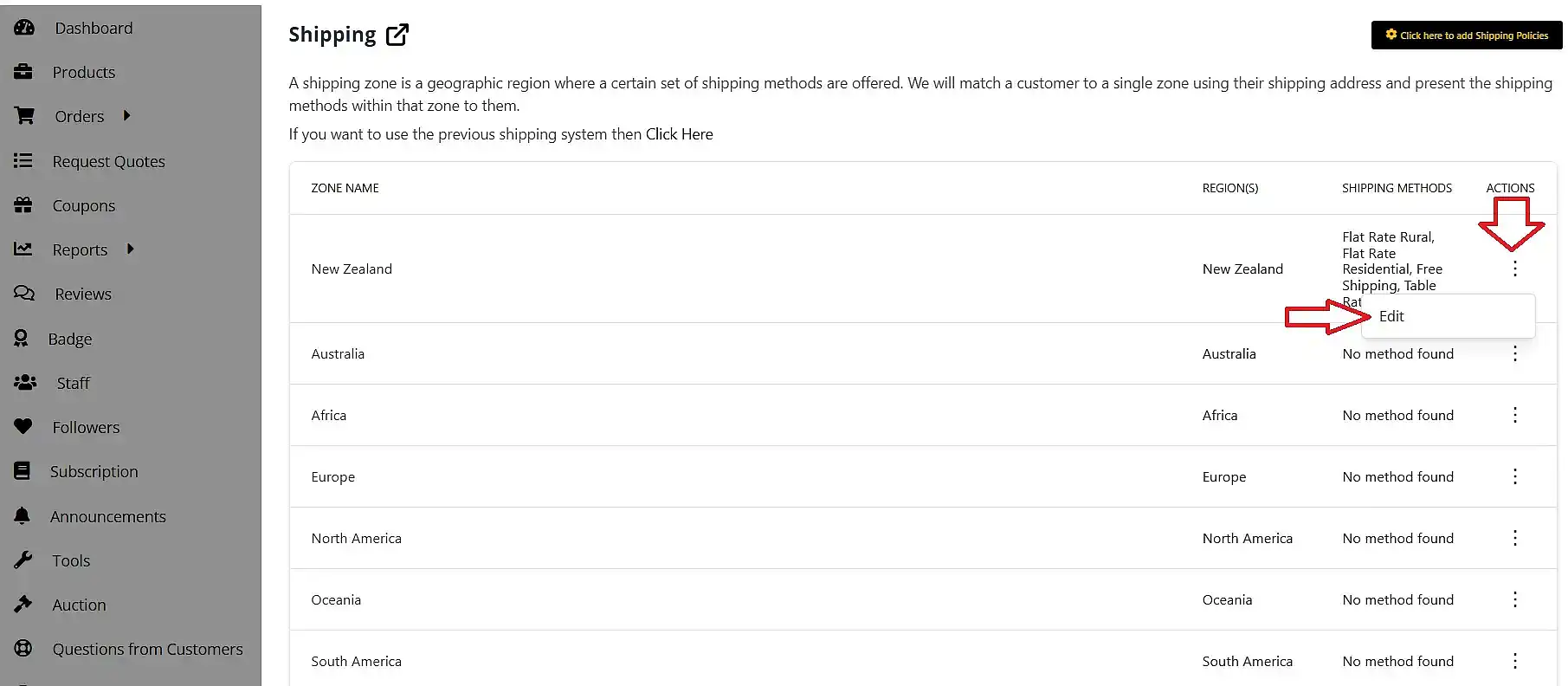
click to edit the region you want to add shipping for

We recommend leaving the ‘select states’ field empty; consequently, your shipping method will apply to the entire region.
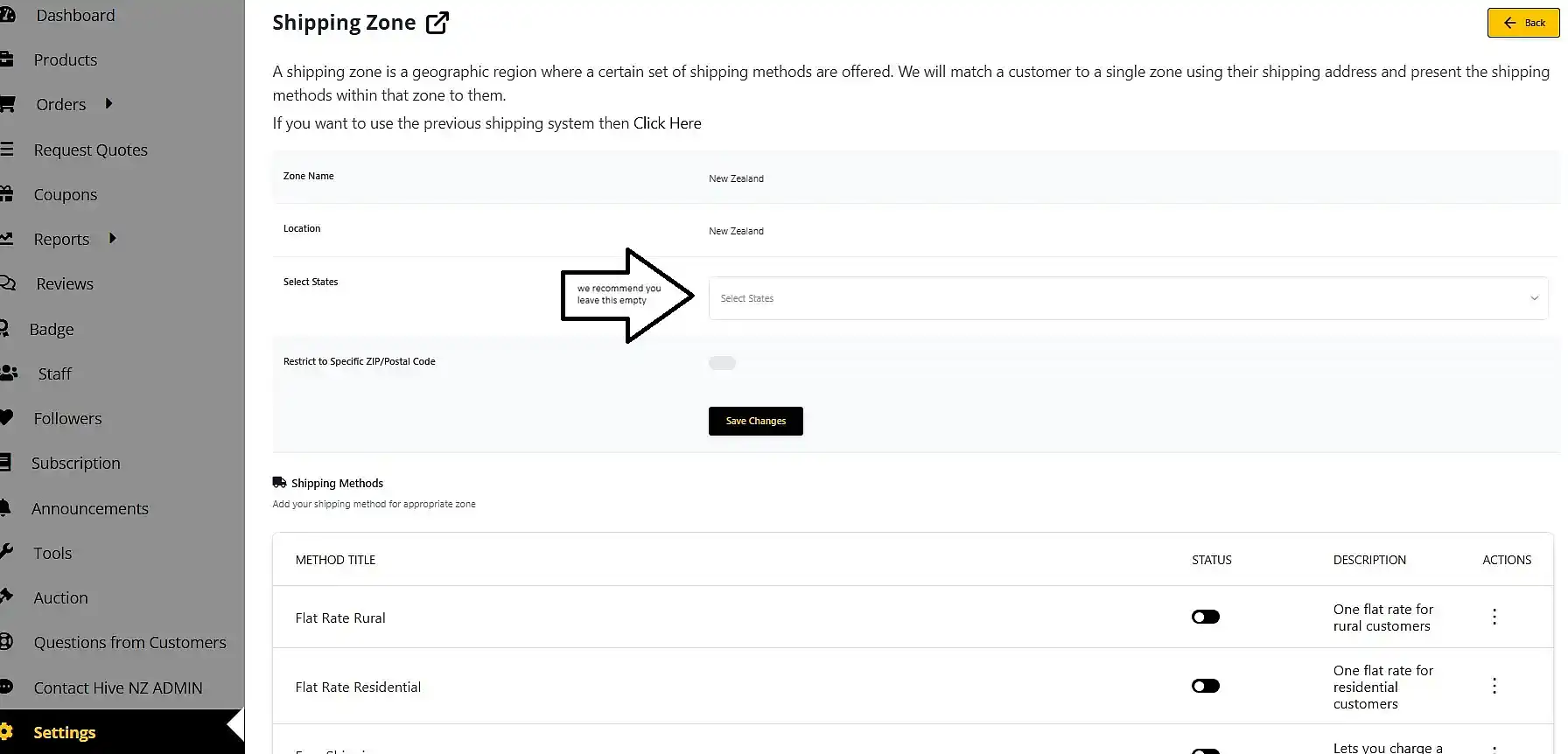
shipping zones leave empty to ship to the whole of new zealand

Step 2: Click ‘add shipping method’ to see a pop-up window.
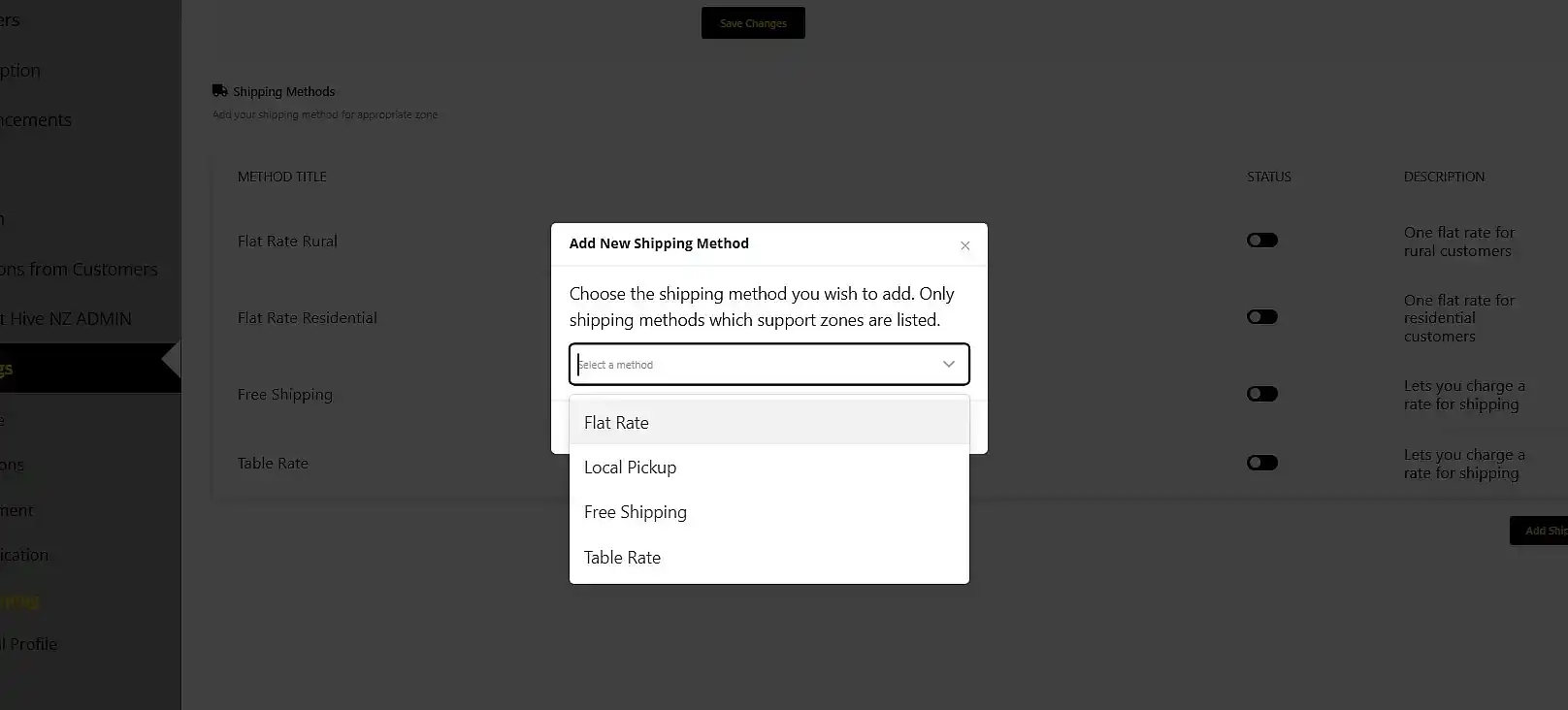
click add shipping method and see pop up

To implement a Flat Rate Shipping method, select ‘Flat Rate’ from the drop-down menu and click ‘add method’.

Note: You can repeat this process if you want different rates, such as one for rural and one for residential customers.

Step 3: You can now edit your shipping option.
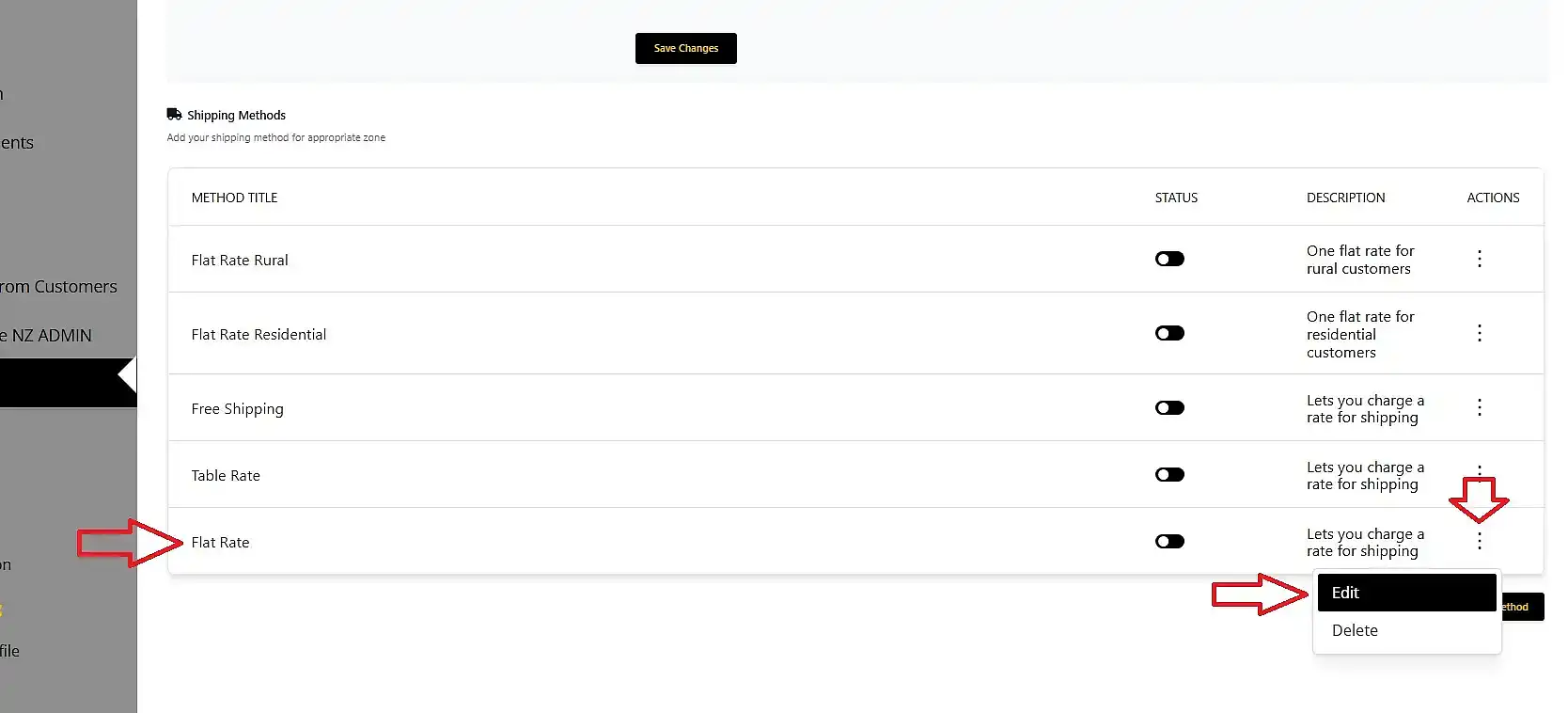
where to click when you want to edit a shipping method

Firstly, set the name under the Method Title field; you can use descriptive names like ‘Rural NZ Wide’ or ‘Flat Rate NZ Wide, this will let the customer know what they are choosing.

Secondly, set the price for that specific option.

You do not need to change any other settings unless you are GST registered. In that case, ensure you update the tax status accordingly.

Finally, scroll down and click ‘save method’.
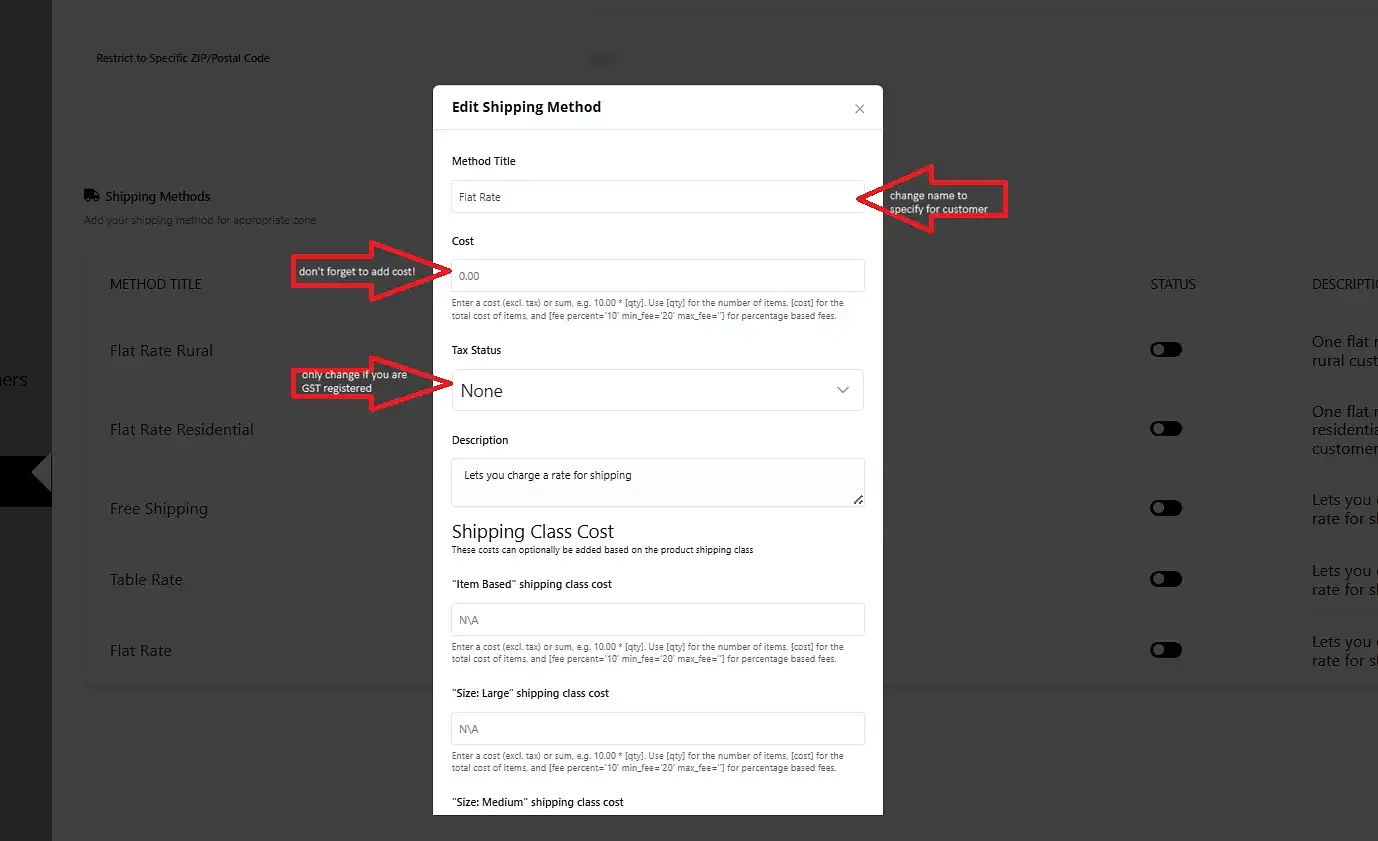
flat rate shipping what to fill in

Step 4: Your new Flat Rate Shipping method will now appear in your list.
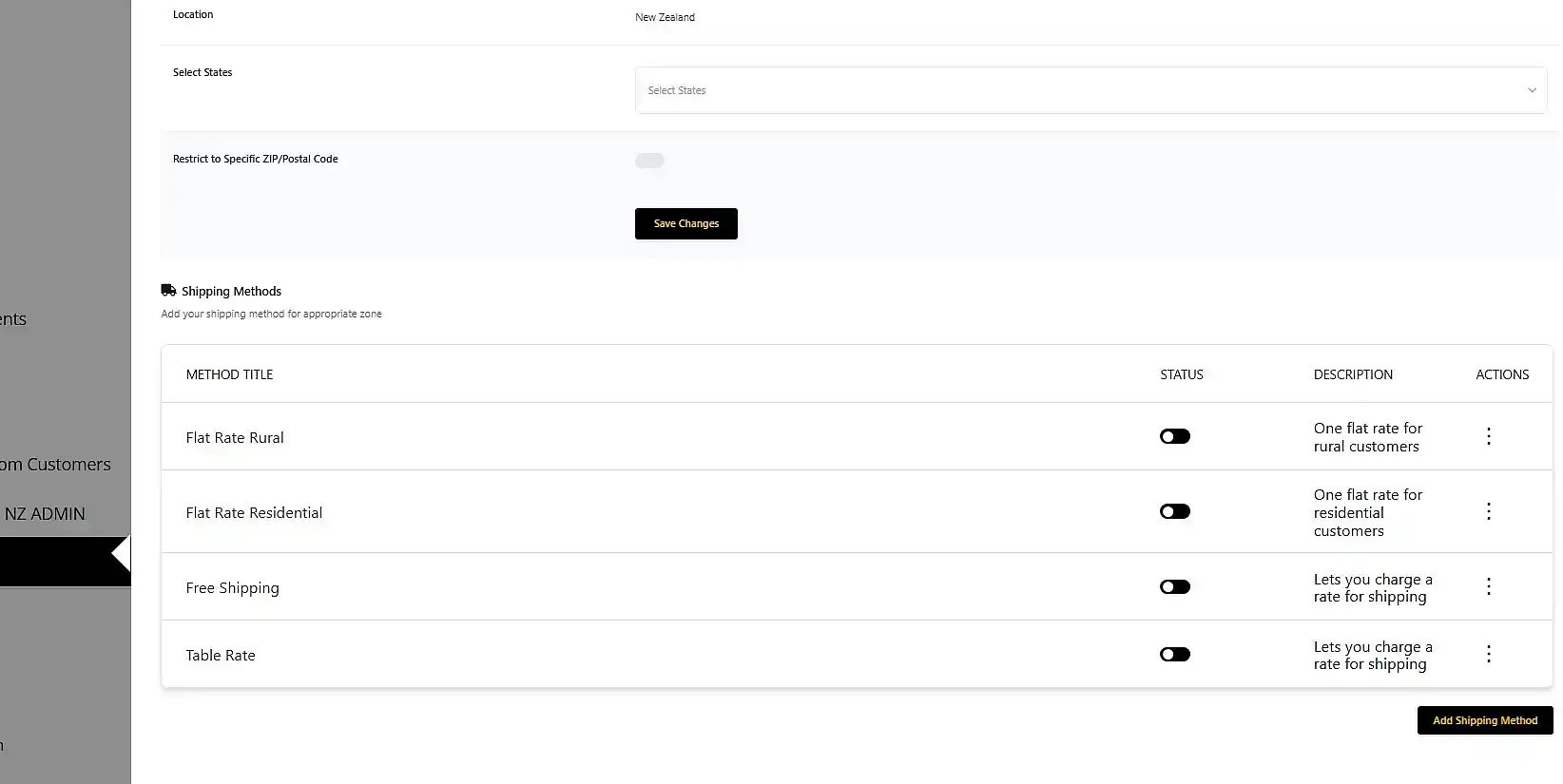
all the set up shipping methods in a list

You may leave it as it is, or you can add more methods to the list to suit your business needs.

Important Considerations for Your International Zones

You are also able to set up shipping methods for international zones.

However, if you choose not to set these up, customers from those countries will be unable to shop from you.

We do not advise setting up shipping based on individual postcodes or specific states. It has proven difficult to keep this information accurate and up-to-date on a worldwide scale.

Shipping & Delivery

Welcome to your shipping command centre. Whether you are sending local goods or shipping worldwide, our marketplace gives you full control over your delivery strategy. Shipping is one of the most important factors in customer satisfaction, so use these guides to configure your rates, manage delivery options, and keep your customers informed throughout their journey.

Standardising your shipping setup is the most effective way to reduce support queries and build customer trust. We highly recommend reviewing your strategy regularly to ensure your rates remain competitive and profitable.

PLEASE NOTE: You must manually configure shipping zones for every country you wish to sell to, including New Zealand. If your shipping settings for New Zealand are incomplete, your products cannot go live. If any other country is not specifically activated in your settings, customers from that region will be unable to complete their order.

Our individual guides explained:

Shipping Guides

Shipping Strategy: How to Maximise Sales Learn how to avoid the “shipping trap” by calculating your true costs. Discover how to use your delivery options as a competitive advantage to increase your average order value. Understand the financial impact of incorporating shipping into your product pricing versus using separate rates.

Configuring Your Shipping Dashboard This is the most vital step in your setup process. You must complete this section to ensure your shipping details appear on your product listings. Failure to do so will result in customers being unable to see shipping costs, which almost always leads to abandoned carts.

Flat Rate Shipping Guide This guide covers the setup of your standard shipping rates for simple, predictable deliveries. It is the most commonly used method for shops with consistent packaging sizes. Use this for your baseline shipping configuration.

Advanced Flat Rate: Product-Based Add-ons Learn how to get creative with your flat rate shipping to protect your margins. This guide shows you how to set a base rate and add small, incremental fees for each additional product. It is ideal for shops selling items of varying weights and sizes.

Free Shipping: Best Practices Offering free shipping is a powerful way to boost conversions. This guide explains how to set clear, effective free shipping thresholds that encourage customers to add more to their baskets. Learn how to balance these offers to keep your shop profitable.

Local Pickup Provide a convenient, zero-cost option for your local buyers by allowing them to collect their orders. This guide explains how to enable this feature securely. It is an excellent way to build local connections and simplify your fulfillment process.

Table Rate Shipping For complex inventories, our table rate system allows for precise shipping calculations. Use this for weight-based, volume-based, or tiered pricing structures. This is the best choice for vendors with a wide variety of product sizes and shipping requirements.

International Shipping & Regional Setup Expand your reach by selling to customers around the globe. This guide walks you through activating specific countries and managing international shipping expectations. Remember: if you do not set up a country, customers in that region will be unable to order from you.